


Lectures, classes, and meetings that are recorded automatically with a Mediasite hardware recorder will typically automatically show up in the linked video collection within the Blackboard course.
Course Content
Total learning: 18 lessons
Time: 90 minutes
-
Mediasite and Blackboard for Students
Discover how to search, play and interact with Mediasite videos embedded in your Blackboard LMS course.
-
What is Mediasite 5 minutes PreviewLecture1.1
-
Watch a Mediasite Video within Blackboard Ultra 5 minutes PreviewLecture1.2
-
Search for a Video within Blackboard Ultra 5 minutes PreviewLecture1.3
-
Video Comments in Blackboard Ultra 5 minutes PreviewLecture1.4
-
Take a Mediasite Video Quiz in Blackboard Ultra 5 minutes PreviewLecture1.5
-
-
Mediasite and Blackboard for Faculty, Instructors, and Professors
For faculty, instructors, and professors, Mediasite's integration with Blackboard make it easy to create, manage, and watch your course videos all from within the Blackboard LMS.
-
Access My Mediasite from within Blackboard Ultra 3 minutes PreviewLecture2.1
-
Add a Video to Mediasite 5 minutes PreviewLecture2.2
-
Add a Mediasite Channel to Blackboard Ultra 5 minutes PreviewLecture2.3
-
Add a Mediasite Video to your Blackboard Ultra Course 8 minutes PreviewLecture2.4
-
Upload a Video to Blackboard Ultra 5 minutes PreviewLecture2.5
-
Add a Mediasite Screencast to Blackboard Ultra 10 minutes PreviewLecture2.6
-
Upload a Video from Your Phone to Blackboard Ultra 8 minutes PreviewLecture2.7
-
Add a Recorded Lecture to Blackboard Ultra 03 minutes PreviewLecture2.8
-
Edit Your Video from Blackboard Ultra PreviewLecture2.9
-
Adding Captions to Your Video Presentation Blackboard Ultra 8 minutes PreviewLecture2.10
-
Use and Enable Comments For Mediasite Videos within Blackboard Ultra 05 minutes PreviewLecture2.11
-
Creating a Quiz for Your Mediasite Video from within Blackboard Ultra 10 minutes PreviewLecture2.12
-
Using In Video Quizzes within Blackboard Ultra 10 minutes PreviewLecture2.13
-
Add a Recorded Lecture to Blackboard Ultra
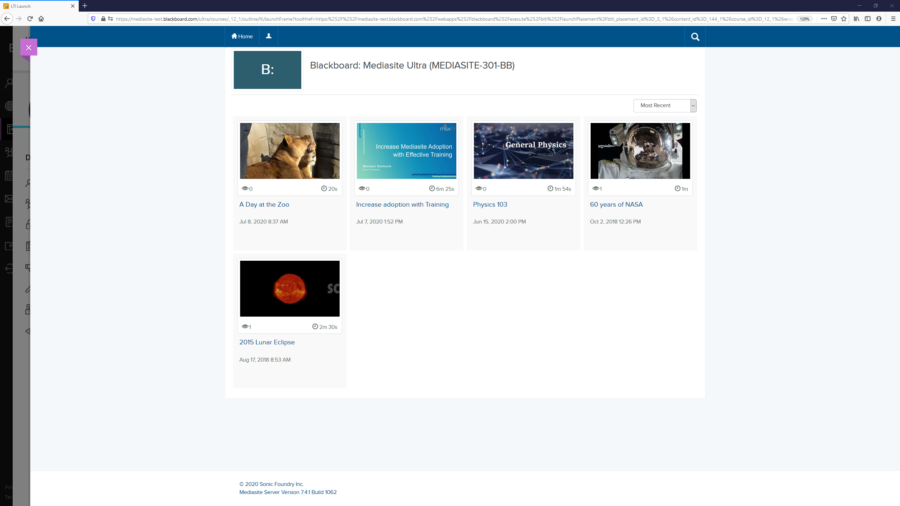
If you do not see your videos automatically show up in the collection of Mediasite Videos within your course, you may need to manually add the video to the Collection or Manually embed add the video to the Blackboard course content page.
If your classes are scheduled to be recorded by a Mediasite Administrator and do not automatically show up in the video collection, talk to them about having your video presentations automatically tagged so that they show up in the video collection immediately after the recording is published.
Was this Information helpful?
Let us know if you found this lesson helpful. That’s the only way we can improve.
Modal title
Main Content